
Turn Your MacBook Into a Headless Server.
Silent. Cool. Always On.
Purpose-Built for 24/7 Lid-Closed Operation
Engineered from the display controller up to protect your MacBook's thermal envelope, battery longevity, and physical privacy.
True Internal Display Power-Off
Instead of merely dimming brightness, MacHead invokes macOS SkyLight APIs to logically disconnect and cut power to the built-in panel. This eliminates GPU scanout overhead and prevents trapped heat from degrading or yellowing your screen under a closed lid.
Hardware-Level Microphone Mute
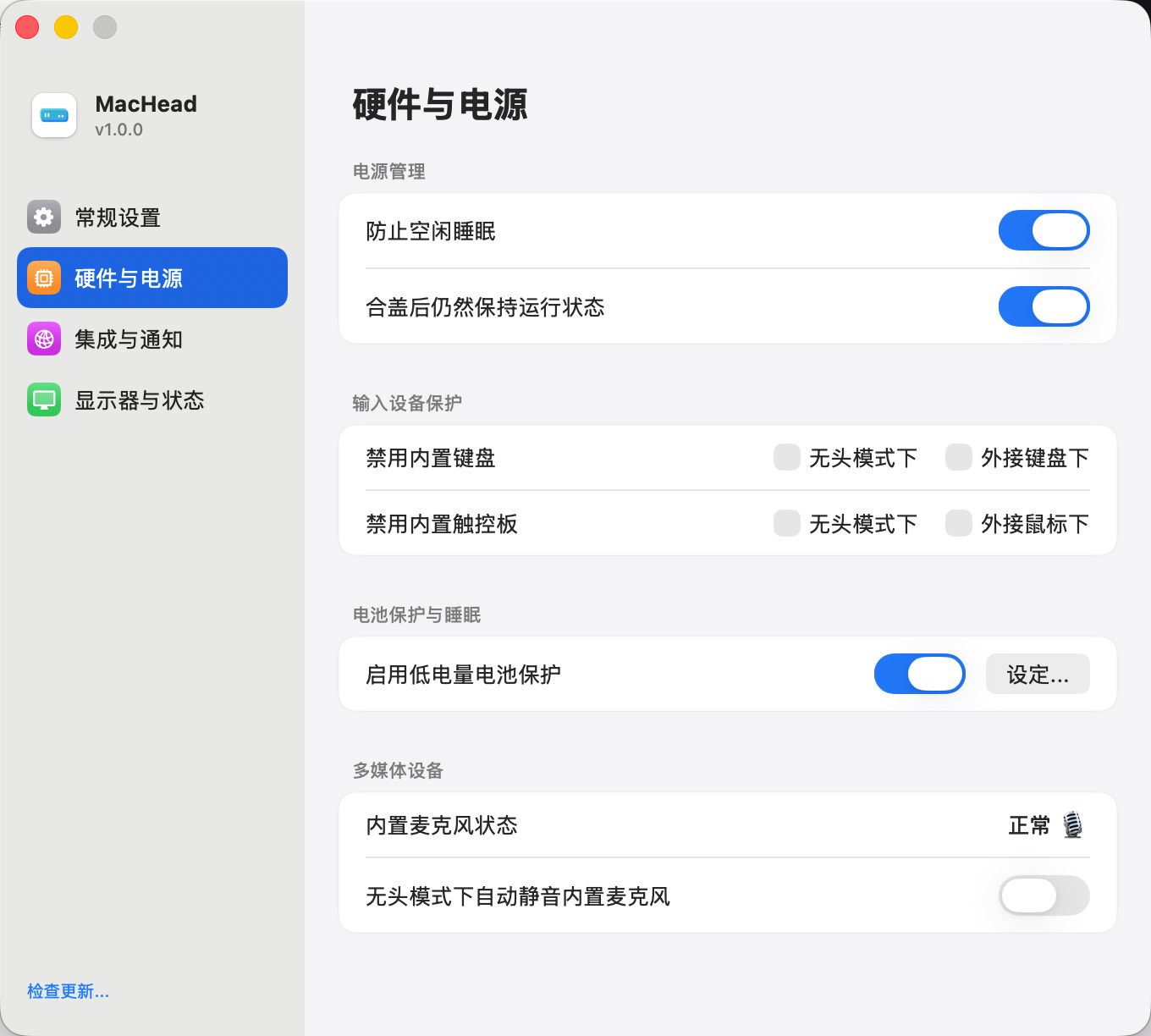
An always-on server shouldn't be an open microphone in your home or office. Whenever Headless Mode engages, MacHead automatically mutes the built-in audio input across the system.
Smart Battery & Charge Limit Guard
Cap charging between 50% and 90% to prevent battery swelling on 24/7 AC power. If mains power fails, built-in UPS logic automatically restores system sleep below your safety threshold to prevent deep discharge.
Built-In Keyboard & Trackpad Lockout
When the lid is closed or stacked in a rack, slight pressure can trigger phantom keystrokes. MacHead intercepts and blocks internal keyboard and trackpad events in Headless Mode while keeping external USB and Bluetooth peripherals fully responsive.
E2EE Cloud Console & LAN Dashboard
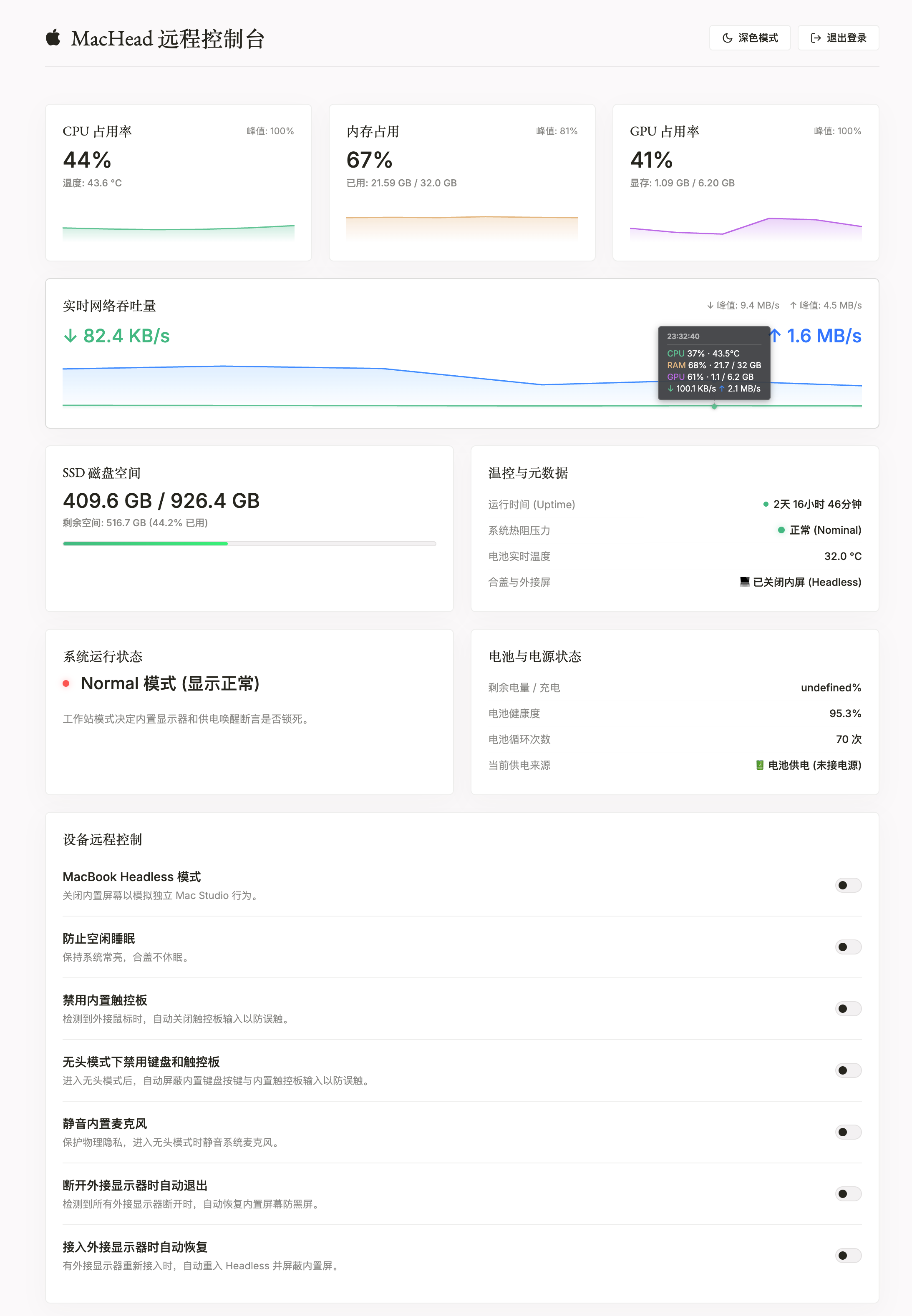
Connect from any browser via MacHead Cloud (dash.headlessmac.com) with Happy Eyeballs 3-track transport (Loopback, LAN WebRTC P2P, and WireGuard E2EE). Access multi-tab web terminals, remote file management, and live CPU/RAM/GPU/thermal telemetry.
Adaptive Display Hot-Plug Recovery
Automatically detects external monitor disconnections and immediately restores your built-in display to prevent black-screen lockouts—then seamlessly re-enters Headless Mode when reconnected.
Native Tunneling & Fleet Monitoring
Ships with built-in clients for Cloudflare Tunnel, Microsoft Dev Tunnels, FRP (frpc), Nezha Monitoring, and ServerStatus. Expose services securely without router port forwarding and monitor your entire Mac homelab fleet in real time.
Interactive Playground
Experience the MacHead CLI and Web Remote Console right in your browser—no installation required.
WebServer: RUNNING (http://192.168.100.131:8080)
Sleep Prevention: DISABLED
Power Source: AC Power (Battery 100%)
MacHead Remote Console
Enter your security password to unlock the dashboard
admin and press Enter
Up and Running in Three Steps
Zero complex scripts or kernel extensions—ready out of the box in under a minute.
Download & Install MacHead
Download the Universal DMG installer and drag the MacHead icon into your Applications folder.
Launch from the Menu Bar
Open MacHead to reveal the menu bar icon. Toggle Headless Mode, configure battery charge limits, or bind your MacHead Cloud account in one click.
Enable Input & Sleep Guards
Grant Accessibility permission if you want automatic keyboard and trackpad lockout when the lid closes, then close the lid and let your server run.
Changelog
Latest feature releases, security hardening, and platform improvements.
Give Your MacBook a Second Life Today
MacHead is 100% free and open source under the Apache-2.0 license, built natively for Apple Silicon and Intel Macs.